Every modpack on this list still installs and plays fine today, but almost all of them run on older Minecraft versions rather than 26.2. That is normal for modded Minecraft. Packs stay on the version they were built for, and your launcher installs that version for you. If you want a starting point, Stoneblock 2 and SkyFactory 4 are the two most people begin with.
Last edited September 2026 for Java 26.3 (Wilderness Bound).
Why Play an Older Modpack?
Modpacks keep working, even when Minecraft updates. A 1.12.2 pack from 2019 plays exactly the same today as it did then, because your launcher installs Minecraft 1.12.2 alongside whatever version you normally play.
Older packs have deeper, more complete mods because those mods had years to mature. Newer packs have current Minecraft features but fewer of the big classic mods. Neither is better, they are just different.
How Do You Install a Minecraft Modpack?
Since modpacks are not included with the base game of Minecraft, you will need a launcher that installs them for you.
- CurseForge App – Use this for most packs on this list. It comes in two versions now, a lightweight standalone app and an Overwolf version with extra features. The standalone one is fine if you just want to play.
- FTB App – Use this for anything made by Feed The Beast, which covers Stoneblock 2, Infinity Evolved, Revelation, Beyond, Sky Adventures, and DireWolf20.
- Prism Launcher – Free and open source. Handy if you want to run several packs side by side without them interfering with each other.
The launchers make it very easy to play modpacks. You simply pick a pack from the list and it automatically installs the pack for you.
You will never type your Minecraft password into a modpack launcher. When you hit play, the launcher opens the official Minecraft Launcher or a separate Microsoft login page, and you sign in there with your Microsoft account (Mojang accounts were retired years ago). If a launcher asks you to type a Minecraft username and password directly into its own window, close it and use one of the three above instead.
Two other things to sort out before you click play:
- RAM – Most of the packs here want 4GB to 6GB allocated. The bigger kitchen sink packs like Revelation want 6GB to 8GB. There is a memory slider in your launcher settings, and giving a pack too little RAM is the most common reason it crashes while loading a world.
- Version branches – A few packs were released for more than one Minecraft version. The version listed below is the main release, but check the CurseForge or FTB page before you install so you get the branch you want.
Which Classic Modpack Should You Play?
Here is a quick comparison of all fifteen packs.
| Modpack | Style | MC Version | Launcher | Still Updated? |
|---|---|---|---|---|
| SkyFactory 4 | Skyblock | 1.12.2 | CurseForge | No |
| Stoneblock 2 | Underground skyblock | 1.12.2 | FTB App | No |
| RLCraft | Hardcore survival | 1.12.2 | CurseForge | No |
| Infinity Evolved | Kitchen sink | 1.7.10 | FTB App | No |
| Valhelsia 3 | Kitchen sink | 1.16.5 | CurseForge | No |
| Regrowth | Questing, wasteland | 1.7.10 | CurseForge or FTB App | No |
| Agrarian Skies 2 | Questing skyblock | 1.7.10 | CurseForge | No |
| FTB Revelation | Kitchen sink | 1.12.2 | FTB App | No |
| Farming Valley | Farming and town building | 1.10.2 | CurseForge | No |
| DireWolf20 | Kitchen sink | Many versions | FTB App | Yes, new pack per version |
| Sky Adventures | Skyblock | 1.12.2 | FTB App | No |
| Forever Stranded | Desert survival | 1.10.2 | CurseForge | No |
| FTB Beyond | Kitchen sink | 1.10.2 | FTB App | No |
| SevTech: Ages | Progression gated | 1.12.2 | CurseForge | No |
1. SkyFactory 4
Minecraft 1.12.2 | CurseForge App | 4GB to 6GB RAM
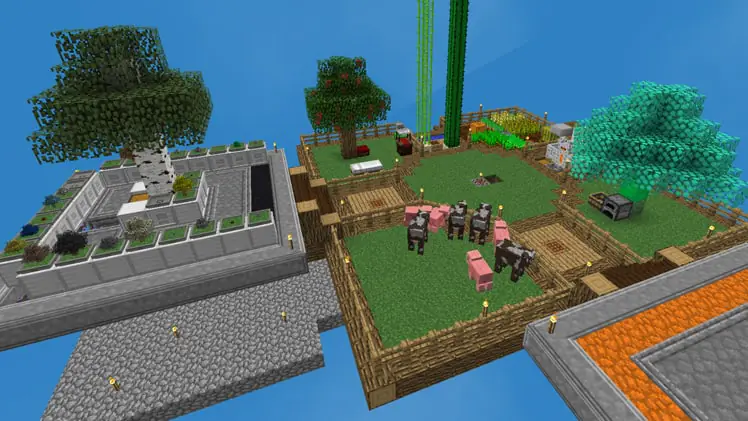
SkyFactory 4 (SF4) is definitely one of the most fun modpacks you can play in Minecraft. It is skyblock on steroids, and from the name you can probably guess what you will be doing. Building a factory in the sky of course!
You will start on a small chunk of land with a tree, which is standard for all skyblock maps. Next, you’ll have to progress through the pack to expand your island and obtain all the other items in the game. The progression will take you from getting resources from special trees, making a mob farm, generating power, and eventually applying all the best Minecraft enchants.
It’s quite different from Sky Factory 3 (SF3), for example there is no more sifting for resources. The majority of resources are obtained from trees in this version and there’s also no draconic evolution. There are many different variations of skyblock, however SkyFactory 3 and 4 are the most popular variants.
Mojang wrote a full article about this pack on minecraft.net, which is unusual for a modpack and tells you how big it got. You can read their post going over it here.
The official download page can be found here, or you can use the CurseForge launcher to download and play it.
2. Stoneblock 2 (FTB)
Minecraft 1.12.2 | FTB App | 4GB to 6GB RAM
Stoneblock 2 (SB2) is uniquely the opposite of skyblock or SkyFactory, but somehow shares similarities. Instead of building in a totally empty world in the sky, you are building in a world filled with stone and you have to carve out an underground base.
It can be annoying mining the stone in the beginning, but once you get an RFTools Builder it gets much easier to dig out massive amounts of stone. Personally, I have found this to be a very fun modpack to play and definitely recommend trying it.
This pack makes use of the Project E mod, which can be somewhat overpowered as it lets you trade most items for other items (using the EMC system). For example, you can exchange 100 stone for 100 EMC, then use this EMC to purchase other items like diamonds or iron. The pack also includes Draconic Evolution, which unlocks a ton of end-game content to keep you busy.
Once you accumulate a lot of EMC, the game feels a bit like creative mode since you can instantly obtain nearly all items in the game. You could pretty much even build a Minecraft house out of diamond blocks! However, the EMC system can be nice because it allows you to trade your “junk” for EMC and buy more valuable things like diamonds.
A very cool idea for a base in this game is to use the Builder to hollow out a big dome, then use the luminous blocks to make a fake sky, clouds, and sun. This process is fully automated with the Builder block, and you don’t have to manually break and place all the blocks.
This is my favorite pack on the list, so I have also made a Stoneblock 2 starter guide with tips for getting through it.
To play this pack, use the official FTB App from their website.
3. RLCraft
Minecraft 1.12.2 | CurseForge App | 4GB to 6GB RAM
This “real life” style modpack features more realistic graphics and very challenging gameplay. This pack is a good choice for veteran players who are bored of plain old Minecraft and want to change up their gameplay drastically.
Many basic mechanics get changed in this pack to make survival Minecraft challenging. You have thirst and body temperature to manage, and you cannot craft basic tools until you level up the right skill. There can be dragons flying around in the main world and you could be killed in one shot just walking around! Don’t believe me? Just check out the video above for a sneak peak of what you can expect. This pack is not for the faint hearted and the creator even warns players that “they will die… alot”.
RLCraft is one of the most downloaded modpacks, and it is still the one players dare each other to try. It has stayed on 1.12.2, however there have been some fan-made branches to newer versions.
Are you ready for the Minecraft challenge of your life? RLCraft can be downloaded here.
4. Infinity Evolved (FTB)
Minecraft 1.7.10 | FTB App | 4GB RAM
FTB Infinity Evolved (IE) is a “kitchen sink” modpack, meaning it is a general all-purpose modpack that can facilitate many gameplay styles. It has most of the popular mods of its era and two difficulty modes: normal and expert.
Infinity Evolved Expert Mode is a way to prolong gameplay by making recipes more difficult. You will need way more blocks and items to craft things, which makes the pack take longer to progress through. If you find you’re finishing modpacks too quickly, you should definitely look into IE expert mode.
This pack is best if you want more freedom to do whatever you want. For example, with the SkyFactory 4 modpack, you have to build a floating island base and there is no other choice. With this pack, there are so many things to build in Minecraft (that aren’t floating island bases)!
Be aware that 1.7.10 is an older version of Minecraft. It runs on almost anything, but it looks and feels a little dated compared to the rest. This is a Feed The Beast pack, so download it using the official FTB App.
5. Valhelsia 3
Minecraft 1.16.5 | CurseForge App | 4GB to 6GB RAM
Valhelsia 3 runs on Minecraft 1.16.5, which makes it a more modern modpack. That was a real selling point when it came out, though plenty of packs have moved past it since.
The trade off it made still applies. You get more recent Minecraft content, but some of the big classic mods are missing because they never updated that far. Mods you will not find here include Draconic Evolution, Tinker’s Construct, and EnderIO.
You will still find a lot of great mods in this pack, including some of my favorites: Botania, Biomes O’ Plenty (adds lots of new Minecraft biomes!), and Immersive Engineering. If you want the newest Minecraft version of anything on this list, Valhelsia 3 is it.
This modpack can be downloaded on the CurseForge launcher or on their CurseForge page here.
6. Regrowth
Minecraft 1.7.10 | CurseForge App or FTB App | 4GB RAM
Regrowth is a themed pack with a questline that guides you through the objectives of the pack. The general theme is that you start in a wasteland world and you have to progress to “regrow” the world back. This pack can be a unique twist for players who like to “rebuild” the world, like in skyblock packs.
Progression in this pack is definitely a bit slower and the mobs can be stronger, so this pack can be more challenging to play through. Since the progression is slower than most other packs, you’ll also get more hours of entertainment out of this pack. It will also be more difficult to defend yourself against monsters since it will be slower to get the proper equipment to defend yourself.
One thing worth clearing up: Regrowth is often listed as an FTB pack because it was carried on the FTB launcher, but it was actually made by a modpack author called thephoenixlodge. You can get it from the CurseForge page here or through the FTB App as a third party pack.
7. Agrarian Skies 2
Minecraft 1.7.10 | CurseForge App | 4GB RAM
Agrarian Skies 2 (AS2) is a quest and objective based skyblock. If you are brand new to Minecraft mods, this pack would be great to learn the basics. The quest book will guide you through the progression step by step.
A major difference between this pack and SF4 is that there is no Mystical Agriculture mod. That makes this pack a bit more difficult and less overpowered. With Mystical Agriculture in SF4, you can “grow” nearly all items in the game, including diamonds, obsidian, wither skeleton skulls, etc. In this pack, you will have to do it the old fashioned way and get your diamonds from sifting and obsidian from lava and water.
This is not a FTB pack, so you will need to download it here or use the CurseForge launcher.
8. Revelation (FTB)
Minecraft 1.12.2 | FTB App | 4GB to 6GB RAM
Revelation is another “kitchen sink” pack, similar to the Infinity Evolved pack. It runs on 1.12.2 while Infinity Evolved runs on 1.7.10, so the mod list is quite different. It includes mods that did not exist when Infinity Evolved was made, and drops older mods that never updated to 1.12.
It is the largest modpack made by FTB, with over 200 mods included. You may need a more powerful computer to fully enjoy this pack and all the mods it offers.
This pack is good if you’re looking for an all-purpose pack that doesn’t have limitations on what you can do. However, if you’re new to modding, the 200 mods may be overwhelming and make it difficult to learn how to play.
As this is a Feed The Beast (FTB) modpack, it can be played and downloaded using the official FTB App.
9. Farming Valley
Minecraft 1.10.2 | CurseForge App | 4GB RAM

Farming Valley is a modpack inspired by Harvest Moon and Stardew Valley. If you’ve played either of these games and liked them, definitely check out this one.
In this pack, you will build up a town and plant, harvest, and sell crops for money to progress. Farming here is tweaked and will be more challenging than in vanilla Minecraft. The Harvest Goddess NPC (which you have to summon at the beginning) will guide you through progression in this pack. There are four seasons and each one has its own crops to buy, plant, and harvest.
If your computer struggles with it, the author also made a Lite version with fewer mods that runs on much weaker hardware. To download and play this pack, visit the CurseForge page here or use their launcher.
10. DireWolf20 (FTB)
Many Minecraft versions | FTB App | 4GB to 6GB RAM
DireWolf20 is a popular YouTuber and this pack is essentially a collection of the mods used in his videos. It is another general all-purpose kitchen sink pack that has gotten quite popular.
A benefit of playing with this pack is you can watch his videos, play along, and learn the mods.
This one is different from the rest of the list because it is not a single pack. FTB releases a new DireWolf20 pack for each major Minecraft version, so there are versions going back to 1.7 and forward into the modern releases. Pick whichever one matches the Minecraft version you want to play and the season of his videos you want to follow along with. You can find them all in the FTB App.
11. Sky Adventures (FTB)
Minecraft 1.12.2 | FTB App | 4GB to 6GB RAM
Sky Adventures is another skyblock map that is similar to SkyFactory, but has slightly different mods.
One major difference is that this pack has the Project E mod (like Stoneblock 2). This mod allows you to trade items for other items using a currency called EMC. If you’ve played Stoneblock 2 before and enjoyed the Project E aspect of it, but would prefer a skyblock map, Sky Adventures would be a good choice to play.
The download page can be found here.
12. Forever Stranded
Minecraft 1.10.2 | CurseForge App | 4GB RAM
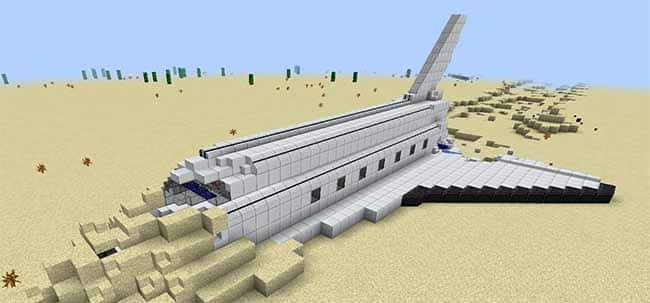
Forever Stranded (FS) is kind of similar to the Regrowth pack in that you play in a wasteland kind of map. You crash land a shuttle on an alien desert planet and have to quickly defend yourself, because the mobs at night are much more challenging than in normal Minecraft. Heat and thirst are working against you from the first day too, so your first jobs are finding water and staying cool.
It is one of the older packs here, but it’s still worth trying out if you’ve already played the others. There is also a sequel called Forever Stranded: Lost Souls if you finish it and want more. The download page can be found here.
13. Beyond (FTB)
Minecraft 1.10.2 | FTB App | 6GB RAM
FTB Beyond is another kitchen sink general purpose modpack, this one built on 1.10.2. It sits between Infinity Evolved on 1.7.10 and Revelation on 1.12.2, so the mod list is a snapshot of what was current at the time.
If you are an experienced modded Minecraft player, you can go through the mod list to see which pack has the most of your favorite mods included. If you are a newer mod player, it may be better to start with a progression based pack that teaches you the mods, like Agrarian Skies 2.
As this is a Feed The Beast (FTB) modpack, it can be played and downloaded using the official FTB App.
14. SevTech: Ages
Minecraft 1.12.2 | CurseForge App | 6GB RAM
SevTech: Ages is heavily progression based. Content is gated into different “ages” and you must progress through each age to unlock content. New recipes become available, new mobs appear, and new ores appear as you advance ages.
This pack is not your typical “kitchen sink” modpack and it is quite unique from the other packs. You start with almost nothing and cannot even see most of the mod list until you have earned your way to it. The download page can be found here.
What Happened to Attack of the B-Team?
Attack of the B-Team was a Technic pack from around 2013 built on Minecraft 1.6.4. It has not been maintained in over a decade and several of the mods in it are abandoned.
You can still install it through the Technic Launcher and it will run, but treat it as a museum piece rather than something to build a long world in. If you liked the chaotic feel of it, Forever Stranded and RLCraft are the closest things on this list.
Frequently Asked Questions
Can you play old modpacks on the latest Minecraft version?
No, and you do not need to. A modpack only runs on the Minecraft version it was built for, and your launcher downloads that version automatically when you install the pack. A 1.12.2 pack will keep working forever regardless of what version Minecraft is on now.
How much RAM do you need for a Minecraft modpack?
Most of the packs on this list run well on 4GB to 6GB of RAM. Larger kitchen sink packs like FTB Revelation want 6GB to 8GB. You set this with the memory slider in your launcher settings, and giving a pack too little RAM is the most common cause of crashes when loading a world.
Do you have to pay for Minecraft modpacks?
No. Modpacks are free. You need to own Minecraft: Java Edition, but every pack on this list can be downloaded and played at no extra cost through the CurseForge App or the FTB App.
Can you play modpacks on Minecraft Bedrock?
No. Modpacks are for Java Edition only. Bedrock supports add-ons and marketplace content, but the mod loaders these packs are built on, like Forge and Fabric, do not exist on Bedrock.
Is it safe to download old modpacks?
Yes, as long as you get them through the CurseForge App, the FTB App, or another established launcher. Avoid mirror sites offering direct downloads of abandoned packs, since old packs attract re-uploads that nobody is checking.
That concludes our list of classic Minecraft modpacks that are still worth playing! Which one did you sink the most hours into? Leave a comment below.
koko
Monday 26th of February 2024
nice!
Sebastian Elsner
Saturday 29th of April 2023
I find realistic themned modpacks Like RLCraft very nice. I have make a new one (Work at Progress) but it Hass unique HD textures for Vanilla and mods. 3D Models and pom at Res 256x (different Version of graphic follows)https://www.curseforge.com/minecraft/modpacks/mrws
.
Monday 16th of January 2023
What ever happened to AOTBT?
Mark
Monday 21st of March 2022
You forgot the best one: All The Mods.
Dule Dolay
Monday 19th of September 2022
@Mark, Agreed. I keep starting modpacks and always end up with ATM7 these days.
Hornblower409
Monday 23rd of August 2021
Nice to see this type of list done by someone who has obviously actually played the pack and not just a copy/paste from the pack description. Thank you for your time and effort.
If I may, I'd like to suggest a different kind of modpack list - Golden Oldies. A list of some older packs that still provide a good experience but that many new players may never have seen or older players might want to play again. e.g. I am replaying the old (1.10.2) Boolyman pack Craft Of The Titans and recording my experiences on Reddit. Having a great time and being on an old Minecraft version doesn't really seem to take away much.
Reddit Link: https://www.reddit.com/r/CraftOfTheTitans/comments/ovfkne/craft_of_the_titans_original_revisited/
BigPlatypus
Sunday 7th of August 2022
This is a great idea! I remember a ton of great modpacks for 1.7.10 like Blightfall and Life in the Woods Renaissance.