Every Bedrock Edition player can claim the free Pan Cape just by playing, and Mojang now gives away several new capes every year through login events, in-game challenges, Twitch and TikTok drops, and in-person events. This guide covers every way to get a cape in 2026, current as of September 2026.
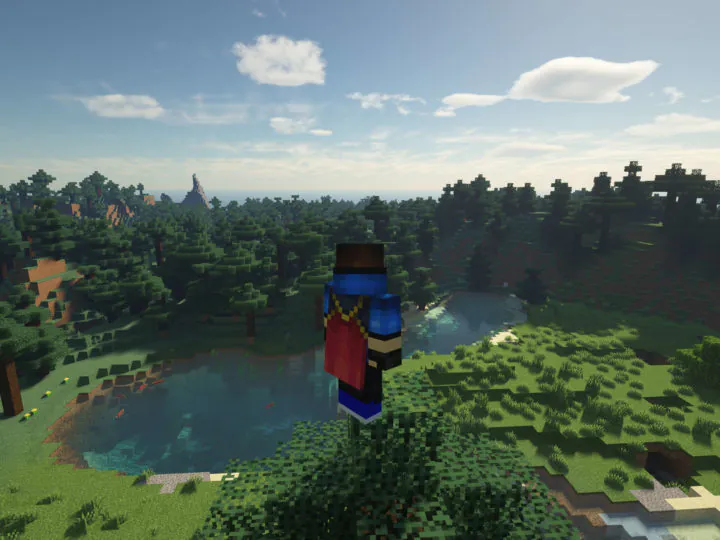
You may have noticed that some players have Minecraft capes, even in fresh new games without mods. You may be wondering, just how did they get a cape and how can I get one too? The good news is that capes are much easier to get now than they used to be!
Capes have been around for a really long time. In fact they were available even since the game was in its beta! They are a normal part of the game (just like player skins) and it is possible for regular players to get them.
Quick Facts About Capes
- Capes are purely cosmetic and don’t give you any gameplay advantage.
- Capes are given to individual player accounts by the makers of Minecraft as rewards. You cannot craft one or buy one directly in the game.
- Capes have predetermined designs. They are not customizable like skins without the use of mods or plugins.
- If you own an elytra, your cape design also changes how your elytra wings look when you wear them.
- Once a cape is on your account, it works in both Java and Bedrock Edition (for capes released in recent years). The Pan Cape is the exception and only works on Bedrock.
Which Capes Can You Get Right Now?
As of September 2026, these are the only ways to earn a cape:
- Pan Cape. Free for all Bedrock Edition players. It has been given out since 2020 and it is the only cape with no time limit. Just sign in to Bedrock Edition with your Microsoft account and check your Dressing Room.
- Moonlight Trail Cape. Given to players who attend the Minecraft Experience: Moonlight Trail event in person. The first stop in Buenos Aires, Argentina ended on August 9, 2026, and the next stop is set to open in Santiago, Chile on October 1, 2026. After you complete the experience, a cape code is emailed to you.
- Minecraft Experience Cape. Given to visitors of the touring Minecraft Experience: Villager Rescue event, whenever and wherever it is running.
More capes are always on the way. New capes have released every few months since 2024, so keep an eye on the official Minecraft social accounts so you don’t miss the next one!
How Are New Capes Given Out?
Capes used to be extremely rare. They were provided to people who helped work on the game (such as translators or Mojang/Microsoft employees), and also players who attended conference events like MineCon in person.
That changed in recent years. Mojang now gives out capes in five main ways:
- Login promotions. Sign in to the game during the promotion window and the cape is added automatically. The Common Cape worked this way (sign in to Bedrock with a Microsoft account before May 5, 2026).
- In-game challenges. Complete a small task in Bedrock Edition during a game drop. For the Copper Cape, players picked up and placed a copper golem statue, and for the Zombie Horse Cape, they defeated four mobs with a spear.
- Watching streams on Twitch or TikTok. Watch a participating Minecraft stream for a few minutes during the drop window, then redeem your code. The Home, Menace, Purple Heart, Follower’s, Copper, and Builder capes were all available this way.
- In-person events. Events like TwitchCon and the Minecraft Experience give capes to attendees. The Crafter Cape (TwitchCon Rotterdam 2026) and the Moonlight Trail Cape are recent examples.
- Account rewards. One-time thank-you capes like the Migrator Cape (for moving a Mojang account to a Microsoft account) and the Vanilla Cape (for owning both Java and Bedrock before June 2022).
Every Official Minecraft Cape and How Players Got It
Here is a list of the capes regular players could earn, and whether you can still get them:
| Cape | Year | How players got it | Still available? |
|---|---|---|---|
| Pan Cape | 2020 | Free for all Bedrock players (Bedrock only) | Yes |
| Moonlight Trail | 2026 | Attend the Minecraft Experience: Moonlight Trail event | Yes (touring, next stop October 2026) |
| Minecraft Experience | 2024 | Attend the Minecraft Experience: Villager Rescue event | Yes, while the event is running |
| MineCon capes | 2011-2016 | Attend MineCon in person | No |
| Migrator | 2022 | Migrate a Mojang account to Microsoft | No |
| Vanilla | 2022 | Own both Java and Bedrock before June 2022 | No |
| Cherry Blossom | 2023 | Participate in the 2023 Mob Vote | No |
| 15th Anniversary | 2024 | Redeem on minecraft.net for the 15th birthday | No |
| Follower’s | 2024 | TikTok drop | No |
| Purple Heart | 2024 | Twitch drop | No |
| MCC 15th Year | 2024 | Complete all 15 challenges on the MCC anniversary event server | No |
| Home | 2025 | Twitch drop (Minecraft movie event) | No |
| Menace | 2025 | TikTok drop (Minecraft movie event) | No |
| Yearn | 2025 | Complete Bedrock movie event quests | No |
| Copper | 2025 | Place a copper golem statue in Bedrock, watch a Twitch or TikTok drop, or visit TwitchCon San Diego | No |
| Zombie Horse | 2025 | Defeat four mobs with a spear in Bedrock survival | No |
| Common | 2025-2026 | Sign in to Bedrock with a Microsoft account | No (ended May 5, 2026) |
| Crafter | 2026 | Complete the sticker quest at TwitchCon Rotterdam | No new codes (event ended May 31, 2026) |
| Builder | 2026 | Watch a Twitch or TikTok stream during TwitchCon | No (ended June 2026) |
Missed a drop? Don’t worry. Mojang has released new capes every few months since 2024, so another chance is never far away.
How to Redeem a Cape Code
Capes from Twitch, TikTok, and in-person events come as a code. Here is how to redeem it:
- Go to the redeem page at minecraft.net/redeem.
- Sign in with the Microsoft account you use for Minecraft.
- Paste your code and click Redeem.
- The cape appears in your Dressing Room (Bedrock) or cape selection (Java). Each account can hold one of each cape.
How to Change your Cape
Once your account is given a cape as a reward, you can freely switch between them. Your cape will be visible in every game you play, including single and multi player games.
- Java Edition: Change your cape on the minecraft.net profile page or in the Minecraft Launcher under skin settings.
- Bedrock Edition: Open the Dressing Room, edit your character, and pick your cape from the owned capes section.
One warning for Bedrock players: some Marketplace skin packs have capes painted onto the skin. These are just part of the skin texture and don’t work like real capes, so check before you buy.
Can You Get a Custom Cape with Mods?
If you really want a cape design of your own, mods can be used to get a “fake” cape. Capes made visible by mods typically don’t show up for other players unless they also have the same mod installed.
The most common mod used to get a cape is the OptiFine mod, however a small donation is required. Since so many people use the OptiFine mod, this is a good way to show off a custom cape.
Frequently Asked Questions
What is the rarest cape in Minecraft?
The MineCon capes from 2011 to 2016 are the rarest. Only a few thousand players attended those events in person, and the capes can never be earned again.
Can you buy or sell a Minecraft cape?
Not officially. Capes are tied to your account and can’t be traded in the game. You may see cape codes for sale on sites like eBay, but those are unofficial and risky, so only redeem codes you got from Mojang, Twitch, TikTok, or an official event.
Why isn’t my new cape showing up?
Make sure you signed in with the same Microsoft account that earned or redeemed the cape. New capes can take several minutes to sync, so wait a bit and then restart the game. On Java, you also need to select the cape in the launcher or on your minecraft.net profile before it appears.
That concludes our guide on how to get capes in Minecraft! Capes look great gliding around with an elytra or standing next to a glowing beacon, and they are one of the best ways to show off on a server. Looking for more ways to stand out? Check out our list of cool things to build in Minecraft. Did you manage to grab one of the 2026 capes? Leave a comment below!