The essential plugins every server needs are EssentialsX (commands), LuckPerms (permissions), WorldEdit and WorldGuard (building and protection), Vault, and CoreProtect (grief rollback). Install those first, then add gameplay plugins like McMMO and Dynmap based on your server’s style. This list is current as of 2026 (Minecraft Java 26.3, Wilderness Bound). Most of these plugins are free, and we point out the ones that cost money.
When starting a new Minecraft server, there are some plugins that are simply ‘must haves’. Although every server can be a little different, these plugins are commonly used across servers of all types (and for good reason).
For those who are new to starting a Minecraft server, we have a basic overview of plugins below:
What Is a Minecraft Server Plugin?
A Minecraft server plugin is a collection of scripts that modify and enhance your server. Plugins can add various new features, such as: adding new commands, changing drops from blocks or mobs, or managing multiple worlds on the same server. There are so many things you can do with plugins, it would be impossible to list them all here!
Plugins are different from mods: plugins run only on the server, so your players can join with a completely normal Minecraft client. If you want content that changes the game itself (new items, mobs, and dimensions), you are looking for mods and modpacks instead.
Although plugins can greatly enhance the player experience on your server, it is important to consider that every plugin on your server will use up more RAM. You may need a more expensive hosting plan if you have too many plugins.
Should I Use Paper, Spigot, or Bukkit?
To run plugins at all, you need special server software. The original was CraftBukkit, then Spigot improved on it, and today Paper is the standard choice. Paper is a fork of Spigot with much better performance, and almost every Bukkit and Spigot plugin works on it without any changes. There is also Purpur, a fork of Paper with extra configuration options.
Our recommendation is simple: use Paper. Download your plugins from Hangar (Paper’s official plugin site), Modrinth, or SpigotMC. Be careful with the old BukkitDev site, as many plugins listed there have been abandoned for years.
A version note for new server owners: Minecraft switched to year-based version numbers in 2026, and Paper uses the same numbers, so Paper 26.1 runs Minecraft 26.1. The old “1.” numbering ended with 1.21.11 in December 2025. The 26.x versions also need Java 25 on your server, so if a 26.x server won’t start, check your Java version first. After a new drop like Wilderness Bound comes out, give Paper and your plugins a little time to release updates before you upgrade.
If you are planning a network of multiple servers with a shared lobby, you will also want a proxy. Velocity is the modern choice and has largely replaced BungeeCord. It lets players jump between your survival, creative, and minigame servers without logging out.
1. EssentialsX
EssentialsX is the first plugin most servers install, and for good reason. It adds the commands your players will expect on day one: /sethome and /home, /tpa teleport requests, /spawn, /warp, kits, private messages, and hundreds of admin utilities.
EssentialsX is split into modules (like EssentialsX Chat and EssentialsX Spawn), so you only need to install the parts you want. Without it, your server has no homes, no warps, and no basic player conveniences, so consider it the foundation of your plugin list.
2. WorldEdit and WorldGuard
Although technically two plugins, you need WorldEdit to install WorldGuard so I bundled them together. These two plugins are essential for all servers! WorldEdit allows you to easily make massive block changes within seconds.
Here are some examples of situations where you may use WorldEdit in Minecraft:
- Removing all the water from a lake or ocean.
- Copying, cutting, and pasting builds to different locations.
- Changing all the blocks within an area to another block. For instance, on my server I changed all the leaves in the main town into jack-o-lanterns for Halloween. After Halloween, I changed them all back to normal leaves.
- Quickly building floors, ceilings, and walls.
- … and so much more! The sky is your limit (literally).
WorldGuard has many uses, primarily assigning land to “zones” to which you can add “flags” and other “rules”. For example, you can make it so only one person or a group of people can build in a certain area, or that only certain people can enter the zone.
This is a good way to prevent people from griefing your spawn or other builds. You can even let players make their own zones up to a limit you set. A very popular alternative to WorldGuard is Grief Prevention, which has a similar (simpler but less flexible) system.
Tip for bigger servers: FastAsyncWorldEdit (FAWE) is a drop-in version of WorldEdit built for very large edits without lagging your server.
3. LuckPerms
You’ll absolutely need a permissions plugin which restricts commands and activities to certain players. LuckPerms is the industry standard and simple to use.
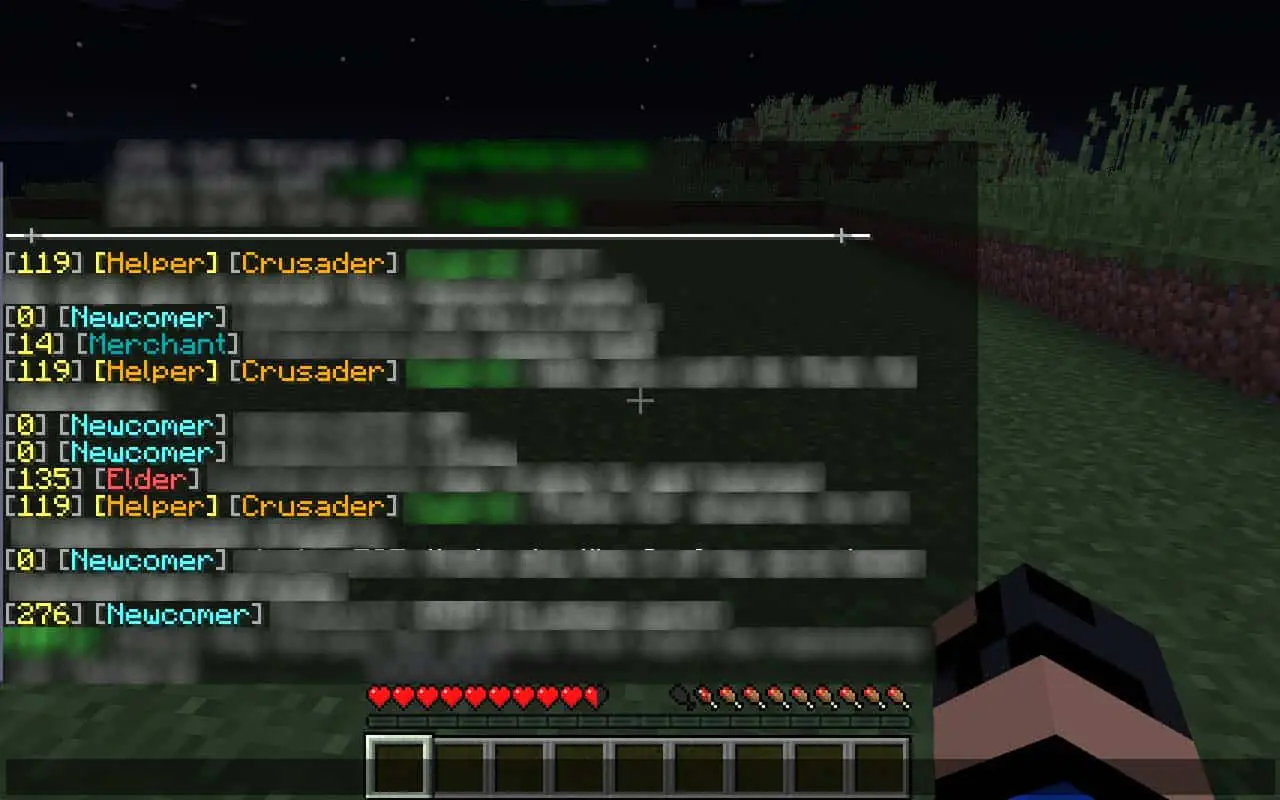
It allows you to make ranks and give commands to those ranks (for example, allowing only staff to use the /fly command, or giving donors a colored chat name). It also allows you to stop players from using commands intended for admins, for example blocking access to WorldEdit for regular players. If you want to have donation benefits or perks, you must have a permissions plugin. Just keep paid perks cosmetic, since Mojang’s rules don’t allow selling a gameplay advantage.
4. Vault
Vault doesn’t do anything visible on its own, but many other plugins require it. It acts as a bridge that lets your permissions, chat, and economy plugins talk to each other.
For example, if you want a shop plugin to charge players money and an economy plugin to hold their balances, Vault is what connects them. Install it early and you’ll save yourself confusing errors later. Almost every economy-related plugin lists Vault as a requirement.
5. CoreProtect
CoreProtect is your insurance policy against griefing. It logs every block break, block place, and chest interaction on your server, and lets you roll back any damage with a single command.
If someone burns down a build or empties a chest, you can inspect exactly who did it and when, then restore everything to how it was. Combined with WorldGuard protecting your important areas, CoreProtect means griefing is never permanent on your server. Every serious survival server should run it from day one.
6. McMMO
This plugin is not for every server, but in general it adds so much for your players to enjoy. McMMO adds an RPG element to the game, allowing players to gain levels in skills like mining, herbalism, fishing, and excavation.
Once players reach certain levels, they get perks like double drops or other special drops. The plugin is very customizable. You can lower or increase the experience needed to level-up and change many perks as you please. The polished version is a paid download on the official site, so check the current price and free options there before installing.
7. Dynmap
Dynmap is one of my absolute favorite plugins. It’s basically a Google Maps for your Minecraft Server and allows people to see all the builds and progress for your server in a web browser.
It’s useful for players seeking a place to build, whether they want to move farther away from other players or they need a specific biome. Another nice feature is you can display things on the map such as player locations, player protection locations, and points of interest.
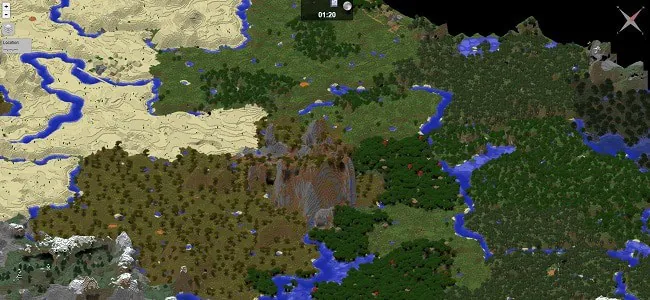
If you’d like something more modern-looking, BlueMap does the same job but renders your world as a full 3D model you can fly around in the browser. Both are free, so pick whichever style you prefer.
8. Multiverse
If you’re planning to have multiple worlds, you will need a world management plugin like Multiverse-Core. You may need multiple worlds if you want a mining/resource gathering world.
A resource gathering world is a good idea because it keeps ‘world griefing’ like deforestation and ugly sand removal in another world. You can reset this world every once in a while so it’s always fresh for your players. It’s also a nice way to give players fresh land to explore after a new drop, since new biomes like the dappled forest only generate in chunks that haven’t been explored yet.
Other reasons to have multiple worlds on your Minecraft server may include:
- Minigames world for spleef, PvP arenas, etc.
- Treasure world which has more ores and better drops. Make this a reward for a rank players earn by playing, since selling access to extra resources counts as pay to win.
- Lobby/Hub world which connects all your worlds together.
- Contest worlds, where players can build entries for a server contest.
- Superflat worlds and creative mode worlds.
- Skyblock worlds.
Honorable Mentions
- Modern LWC – Lets players lock their own doors and chests with passwords and access lists. Pairs well with CoreProtect, since LWC protects the container itself while CoreProtect handles rollback.
- Spark – A performance profiler that shows you exactly which plugin or chunk is causing lag. Install this before you need it!
- Chunky – Pre-generates your world’s chunks so players don’t cause lag while exploring new terrain.
- DiscordSRV – Links your in-game chat with a Discord channel. Essential for community servers.
- GeyserMC – Lets Bedrock Edition players (phones, consoles) join your Java server. Add Floodgate so they don’t need a Java account.
- ViaVersion – Lets players on newer game versions join your server, which is very handy right after a new drop releases.
- ChatControl – Customizing chat appearances, filtering words, and blocking spam.
- Anti-cheat – If you run a public PvP or survival server, install a maintained anti-cheat like Vulcan (paid) or Grim (free). The old NoCheatPlus is no longer maintained, so avoid it on modern versions.
Frequently Asked Questions
How do I install plugins on a Minecraft server?
Download the plugin’s .jar file, place it in your server’s “plugins” folder, and restart the server. Check the console on startup for any errors. Your server must run Paper, Spigot, or another Bukkit-based software for plugins to work.
Do plugins work on Bedrock Edition servers?
These plugins only run on Java Edition server software. However, you can install GeyserMC on a Java server so that Bedrock players can join and enjoy the same plugins.
How many plugins is too many?
There is no fixed limit. Every plugin uses some RAM and a badly made one can add lag, so the quality of your plugins matters more than the number. Install them a few at a time, and use Spark to find any plugin that hurts performance.
Do I need to update my plugins when Minecraft updates?
Usually, yes. Back up your server, update Paper first, then check that each plugin lists support for the new version before you restart. Plugins that haven’t updated yet can break or stop loading. ViaVersion lets players on the newest version keep joining while you wait.
Can my server get the new Wilderness Bound blocks?
Only once the server itself runs Minecraft 26.3. Plugins can’t add new vanilla blocks to an older server, and ViaVersion only lets newer players join, it doesn’t add the new content. Update Paper to a 26.3 build when it’s ready, then explore new chunks to find the dappled forest.
That concludes our list of the best Minecraft server plugins! What other plugins have you found helpful to your server? Leave a comment below!
Hpool
Monday 11th of September 2023
DoubleJump plugin by imDMK is the best double jump plugin I ever seen. Many features and configuration possibilities.
Alex Booth
Tuesday 3rd of April 2018
With McMMO charging $10 to download the plugin, I didnt think you were allowed to charge for content for Minecraft like mods and textures? I thought Mojang put a ban on that?
mythicpencil
Tuesday 3rd of April 2018
Hi there,
The EULA applies to server owners charging players for content on servers. It is allowed to sell other content such as plugins, maps, and mods.
Also, McMMO can still be downloaded for free on their development page.
Thanks for visiting!